Make sense of your first campaign
Did your creator campaign work?
Start with the result you wanted, read the evidence you have, and choose your next move. A worked example shows how to review campaign results without a marketing dashboard full of jargon.
Practical guide
6 minute guide
- Published
- Updated
By CollabBase · Product and campaign guidance. Planning examples are illustrative, not customer results.
The short answer
Choose one goal before the campaign. Record the posted work and the evidence for that goal, check what is included in the totals, then decide what to repeat or change. A sales figure, a view count and a happy comment each answer a different question.
Choose the result you actually care about
If this is your first campaign, start with one business question. Are you trying to get the product seen, encourage interaction, bring people to your site, or make sales? Choose the matching goal in Campaign results so the most relevant recorded outcome leads the page.
Awareness
Review recorded views of the linked posts. Views are exposure, not a count of distinct customers.
Engagement
Review interactions in context. Compare compatible platforms, formats and metric definitions instead of treating every engagement rate as interchangeable.
Traffic
Review tracked-link clicks. A click shows interest in the destination, not a completed purchase.
Sales
Review recorded sales after refunds alongside the costs you have entered. Check which creators have outcome and cost records.
Prepare measurement when a creator agrees
In the campaign, move an agreed partnership to Agreed and use Set up results. Campaign results includes agreed collaborations and later stages, so the people you are still considering do not distract from the work underway.
If you want to measure traffic or sales, agree on the appropriate link or code before the creator posts. Decide what the creator will report and when. Add the live post link once it is published, then record the available metrics or use the supported creator-reporting workflow.
A sales example: read the total, then its coverage
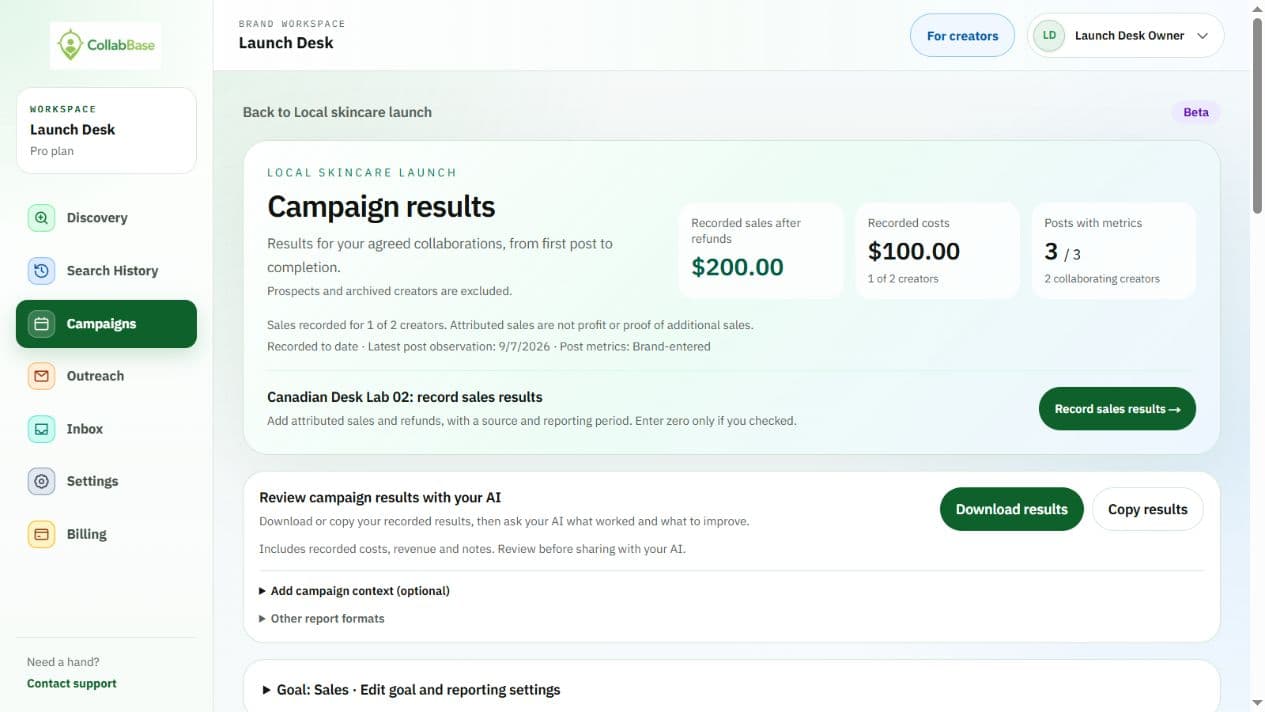
This is an illustrative example, not a customer success story. One creator has $250 in recorded sales, $50 in refunds and $100 in recorded campaign costs. Sales after refunds are $200. That is twice the recorded campaign cost, but it is not a calculation of profit.
Product costs, fulfillment and other expenses still matter. You also need evidence before concluding those sales would not have happened without the campaign. If another creator has post metrics but no sales or cost record yet, that missing record is not a measured zero.
Check the context before comparing creators
Look at the date and source of the observations, the posts included, and any missing costs or outcomes. Two creators measured over different periods or with different post formats may not be directly comparable. Keep a recorded zero distinct from a result that has not been supplied yet.
Use this checklist
- Were both creators working toward the same goal?
- Are the observation periods and post formats comparable?
- Are the important costs and refunds included?
- Is this recorded data, or an assumption you still need to check?
Choose one next move
The point of the report is to make your next decision easier. Once the evidence is complete enough for your goal, choose one focused adjustment instead of changing the creator, offer, product page and budget at the same time. Keep a short note so the next campaign builds on what you learned.
Repeat
A partnership fits the goal and the economics you can support. Discuss a second, clearly scoped collaboration rather than assuming one result will repeat.
Improve
People viewed or clicked but did not take the intended next step. Review the offer, creative and landing experience before simply buying more reach.
Measure first
The relevant outcome or cost is missing. Collect it before ranking creators on an incomplete total.
Take the full report into your own analysis
Want additional analysis? Copy or download the full campaign report for external review with whichever AI or LLM you use. You can optionally add the campaign goal, product context and important constraints. Ask it to separate observations from assumptions and suggest the next evidence to collect before recommending a larger investment.
Campaign analytics and creator reporting are part of the optional paid analytics beta, included with Pro. You can read this guide and inspect the example without an account. Exporting a campaign report does not run another AI analysis in CollabBase.